Most houseplants die within a year. I designed an app to change that. 🌿
Plant enthusiasts weren't failing from lack of care. They lacked guidance, reminders, and a community to learn from. Bloom tackles all three.
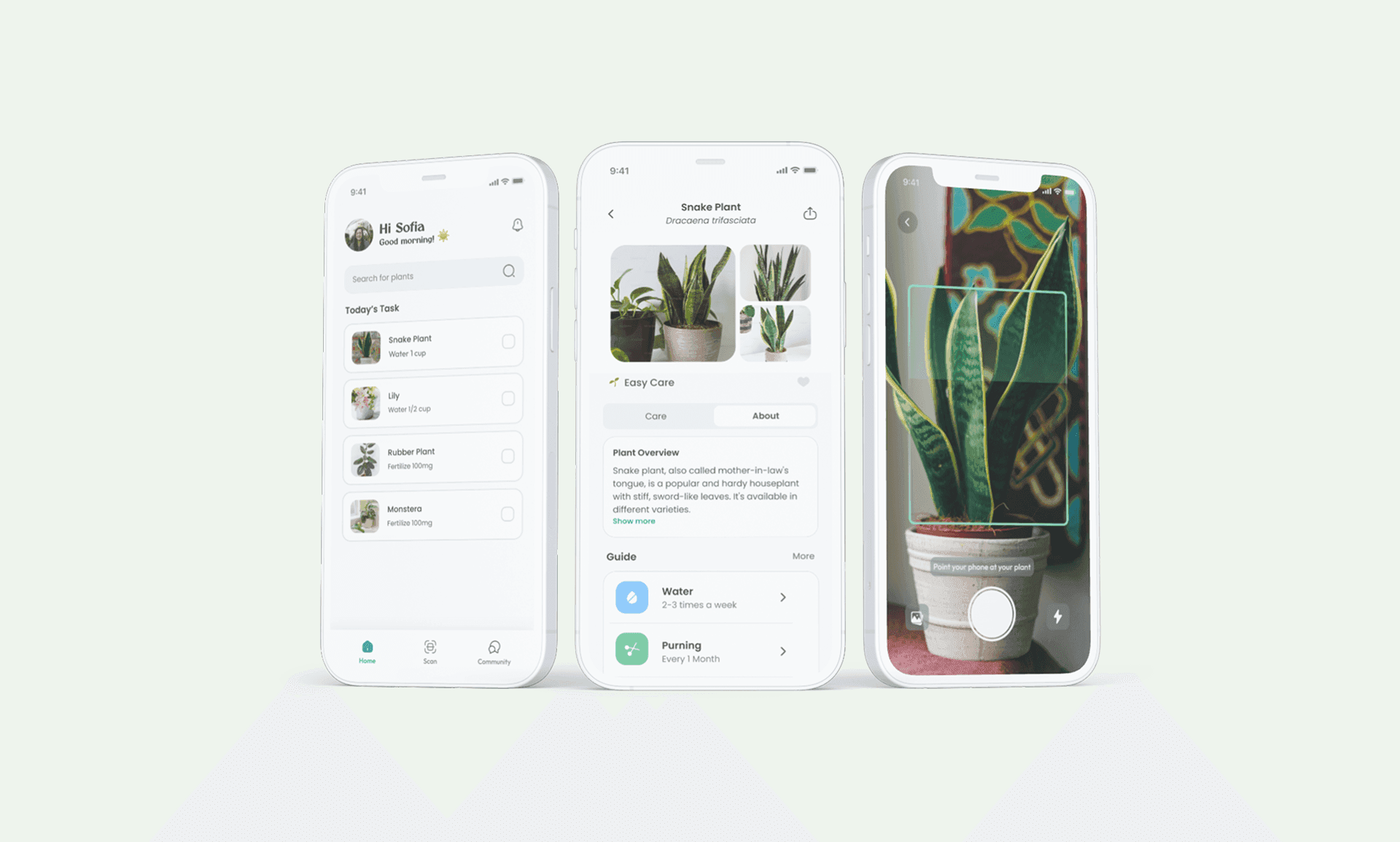
Challenge
Plant enthusiasts lacked personalised guidance, forgot maintenance tasks, and had no community to learn from, leading to plant loss and frustration.
Approach
User interviews to surface pain points, then three design iterations refined through qualitative feedback from real users.
Outcome
Four core features: auto-scheduled care tasks, instant plant identification, a personalised collection, and a community hub.
01 · Research
What plant owners actually struggle with
A Google Forms survey (n=10) followed by 1:1 interviews with 3 participants surfaced four consistent themes.
From the Google Forms survey, n=10 masters students.
Research cohort
Online survey
1:1 interviews
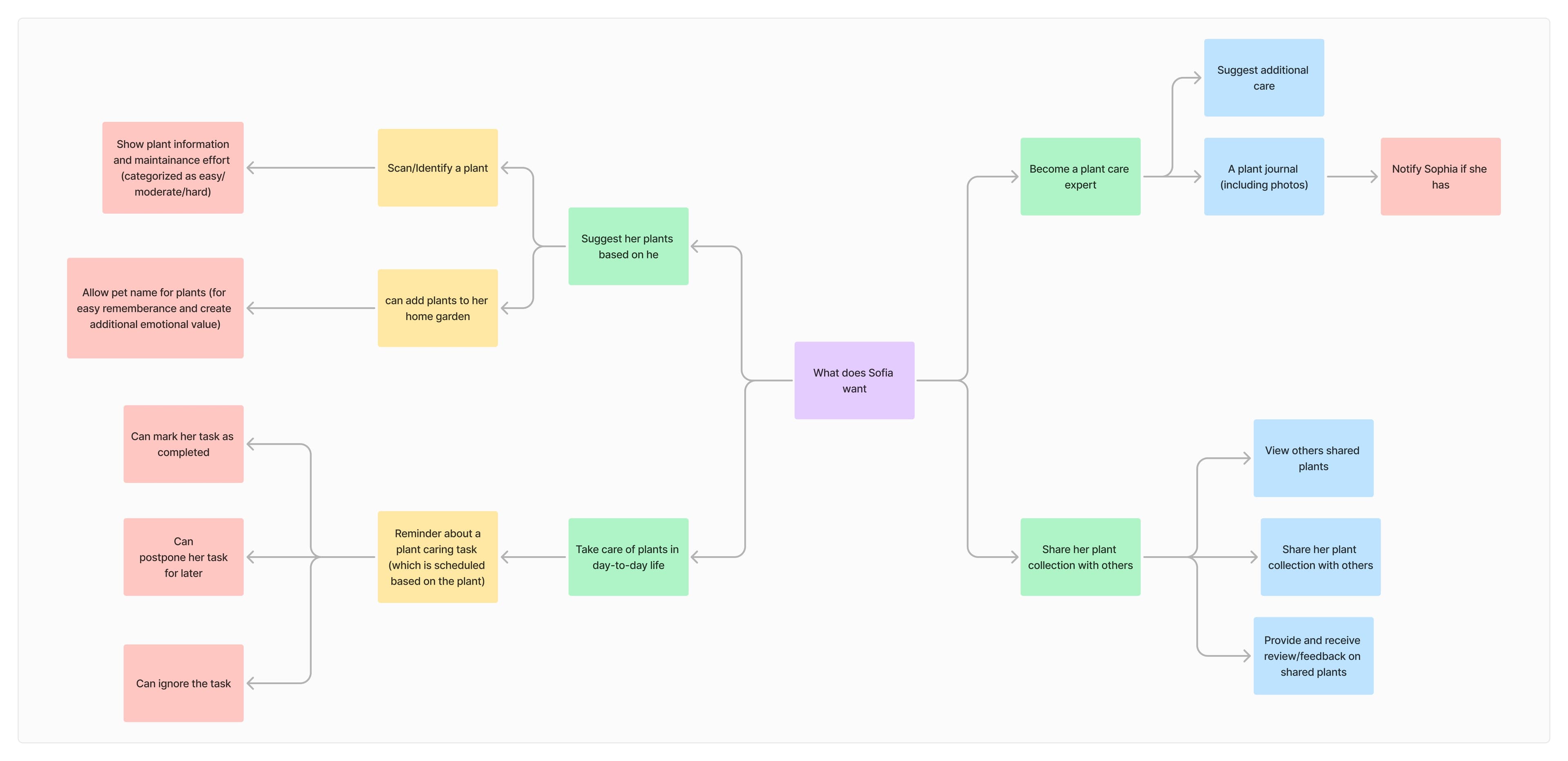
Mind map helped visualise user mindset, uncovering needs, motivations, and pain points in a structured way.
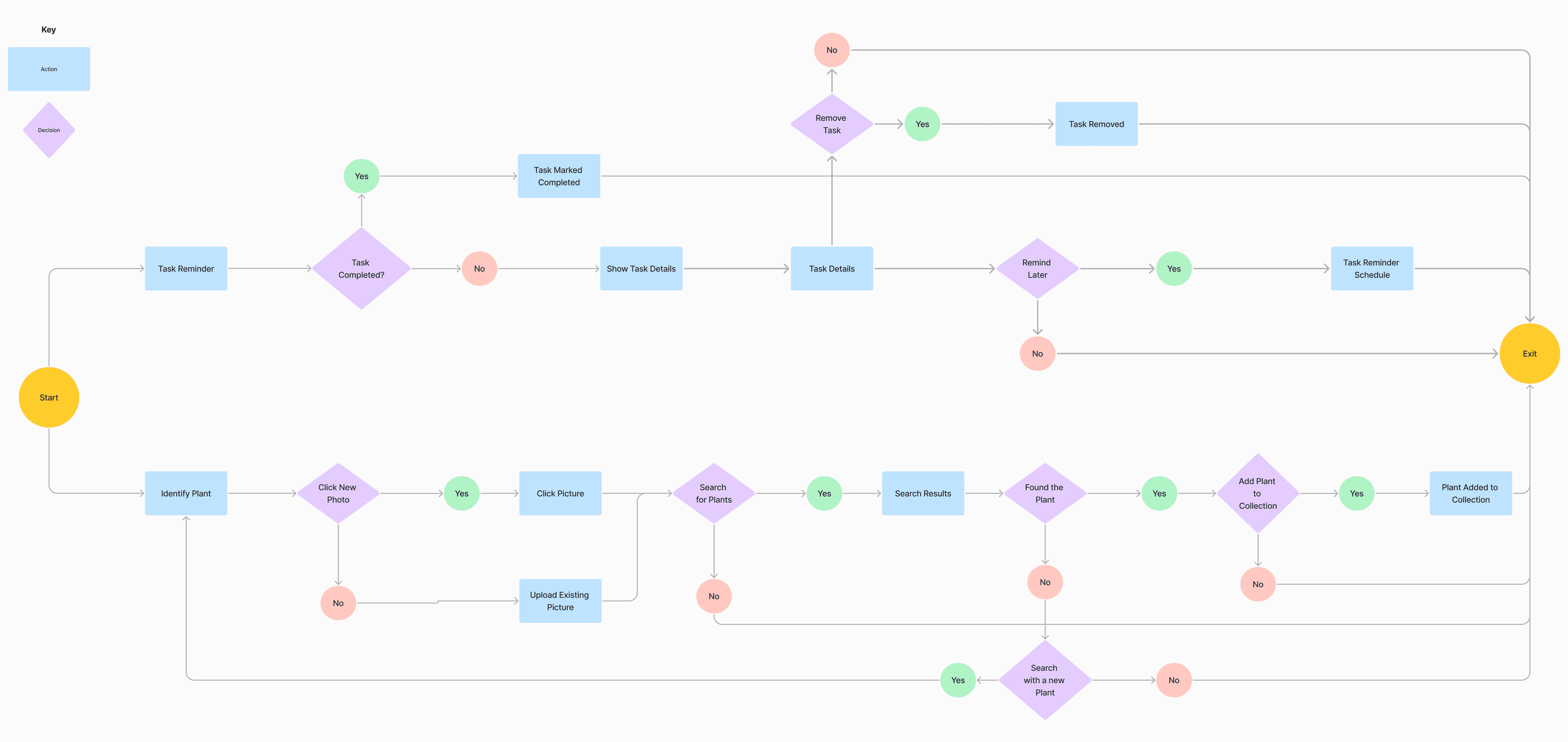
Original V1 user flow mapping the key task paths. Note: this reflects the initial structure and may not match the final V3 screens.
02 · Problem
Plant lovers who keep losing their plants
Three themes from initial conversations shaped the brief: forgetting, lifestyle fit, and emotional connection.
🌿 How might we
Help plant owners feel confident and consistent in their care, without making it feel like work?
Forgetting is the most common reason plants die
It's not neglect. Life just gets in the way. Users care about their plants but have no system to support that care. Without reminders, watering falls through the gaps.
My plants always die in a few weeks as I forget to water them. Every single time.
I wish I could keep a few floral plants as I really like the smell of fresh flowers.
Lifestyle shapes what plants people can realistically own
People aren't choosing plants based on what they like. They're choosing based on what they think they can keep alive. Travel, work schedules, and knowledge gaps constrain the choice before it starts. And when they're unsure, they turn to friends rather than the app.
I like low-maintenance plants as I love to travel.
Sometimes I check in with my friends and family to understand what to do when my plants are drying.
Plants are emotional, but buying one feels like a risk
For some users, plants aren't just decoration. They're companions. That emotional attachment makes the fear of killing one real. And the uncertainty of not knowing if you can care for a plant stops people from buying it in the first place.
I love to check which plants my friends have, so we can have similar ones and create a social media post.
As a pet owner, I see my plant as my child.
Sometimes I love a plant in the store, but I don't know if I'll be able to take good care of it.
03 · Solutions
Four features that address each finding directly
Every feature maps to a specific research finding — expand “Design rationale” to see the thinking.
Auto-Scheduled Tasks: let the app remember so you don't have to
Automatically generates care reminders tailored to each plant type, including watering, repotting, and fertilising. 40% of users said they forget to water, and this removes that responsibility entirely.
5Error preventionGood design prevents problems before they occur. Forgetting to water a plant is an entirely avoidable failure, but only if the system takes on the responsibility of remembering. Asking users to manually configure reminders puts the burden back on them, which is the same problem in a different form.
Design decisionReminders are generated automatically from plant type at the moment of adding a plant. No configuration needed. Plant neglect is prevented at source.
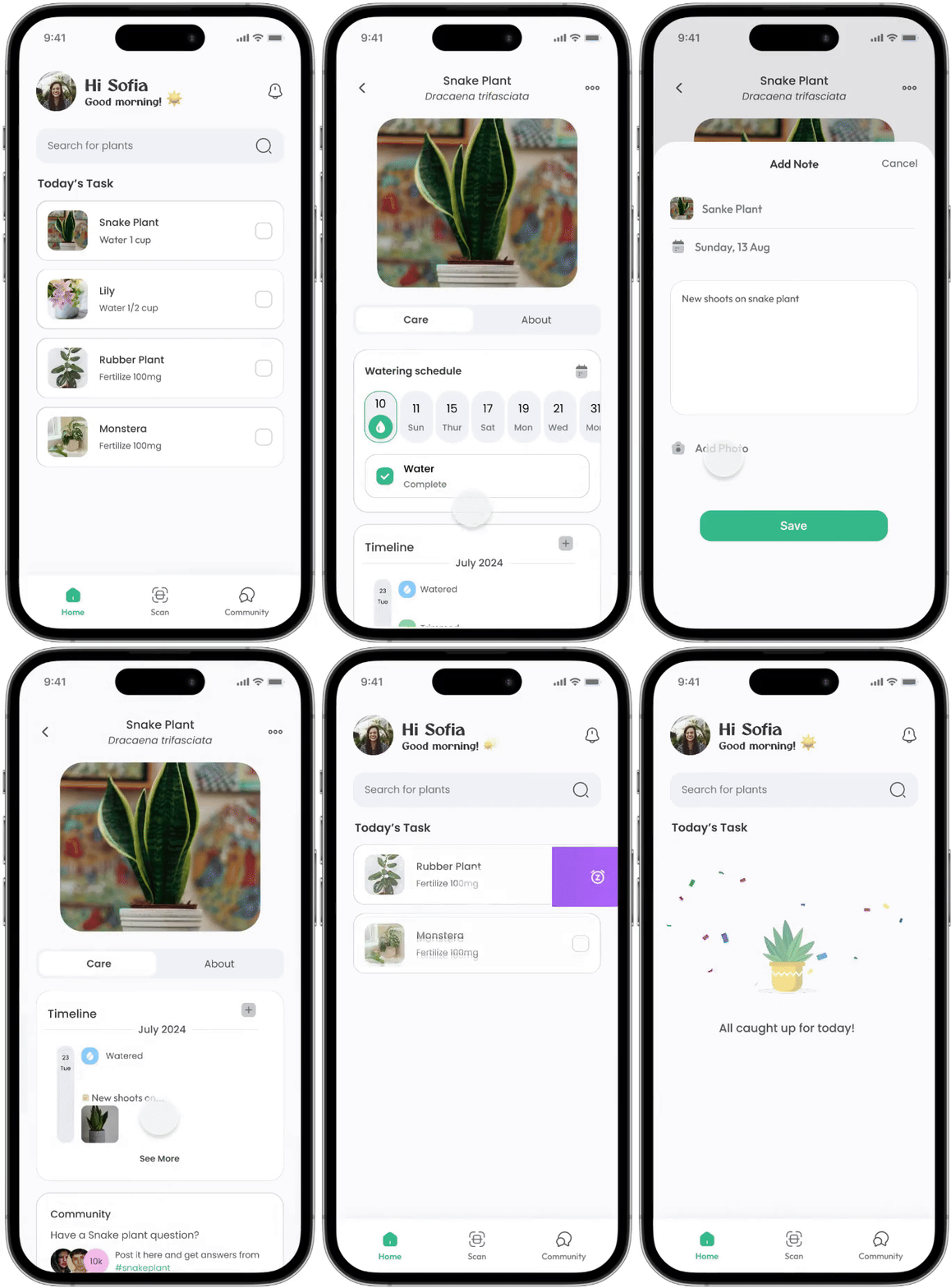
Instant Identification: identify any plant with a single photo
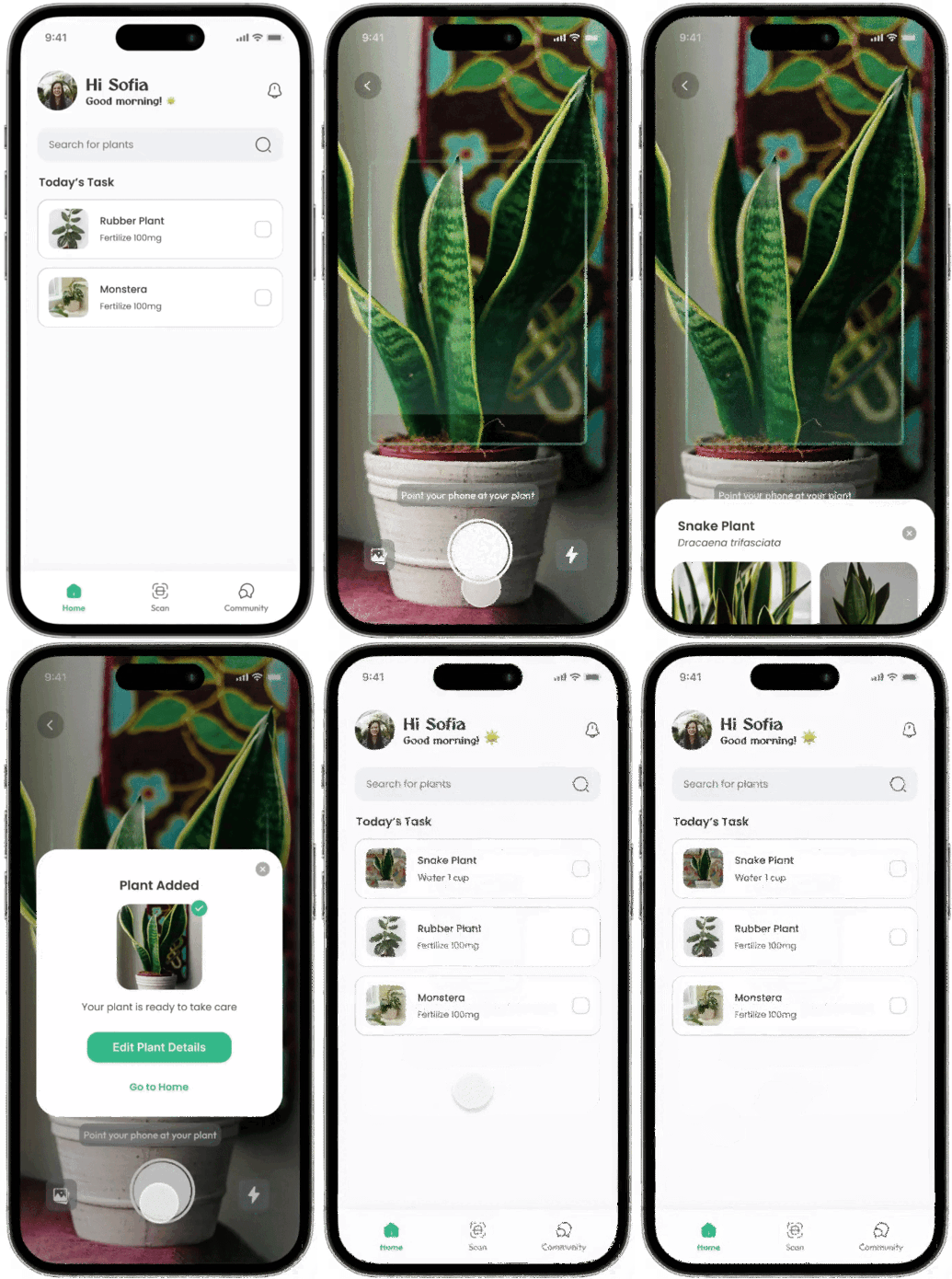
Tap, photograph, and add to your collection in one flow. 70% of users had been unable to identify a plant. This removes the barrier entirely and connects identification directly to care.
6Recognition over recallUsers shouldn't need to know a plant's name to care for it. The original approach assumed users could search by name, but that requires knowing the answer before you've asked the question. Recognition (seeing a photo match) is far lower effort than recall (typing a name you don't know).
Design decisionPhoto identification replaces the search bar as the primary entry point. V2 onwards shows multiple ranked results rather than a single match, keeping the user in control when the top result is wrong.
Plant Collection: a personalised home for every plant you own
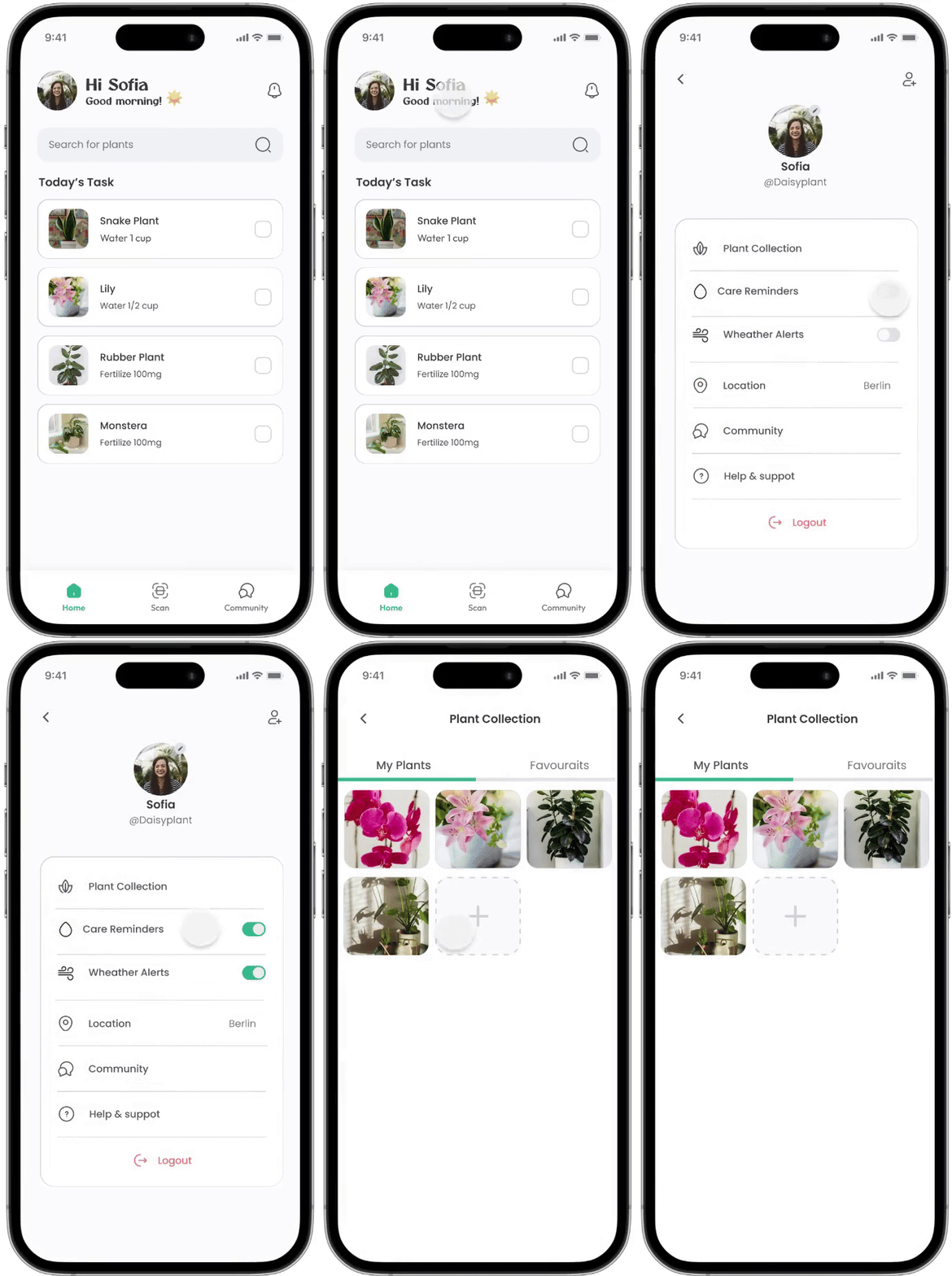
Manage all your plants in one place, each with its own care schedule. Users can name their plants, see care history, and track their growing photo timeline. Care feels personal, not like a chore.
7Flexibility & efficiency of useSystems should serve both beginners and experienced users equally well. V1's add-plant form had all fields required, which overwhelmed new users who didn't know their plant's pot size or soil type. Expert users found it tedious. Neither group was well served.
Design decisionKey fields (sunlight, watering frequency) auto-fill from plant type. Everything else is optional and can be added later. Beginners get started in seconds; experienced users can go as deep as they want.
Community Hub: connect, share, and grow with other plant lovers
A space for plant enthusiasts to share insights, ask questions, and support each other. Addresses the 30% who wanted community, but also fills the knowledge gap that 60% identified. Peer learning at scale.
8Aesthetic & minimalist designEvery extra piece of information competes with the relevant ones. A generic chronological feed would surface noise alongside useful content. Yesterday's post about monstera care gets buried under today's unrelated posts. The wrong structure makes good content invisible.
Design decisionThe community is organised by plant type and care topic rather than chronologically. Content stays discoverable and useful over time, not just in the moment it was posted. Signal over noise.

See all four features in action
Open Figma prototype04 · Key user journey
From buying a plant to care on autopilot
From buying a plant to having a care schedule running, in under 60 seconds.
Open the app
User opens Bloom for the first time after buying a new plant.
Photograph it
Tap the identify button and point the camera at the plant.
Confirm the match
Multiple ranked results shown. User selects the correct plant.
Name and save
Care details auto-fill. User gives the plant a name and adds it.
Care on autopilot
Plant appears in collection with automatic reminders already scheduled.
The entire journey takes under 60 seconds. The app's value — a personalised, automated care schedule — is delivered before the user has even left the shop.
05 · Iterative refinement
Three versions, shaped by real feedback
Three rounds of qualitative testing with the same people, one honest conversation per version.
Core functionality in place. Navigation, identification, and collection built from scratch. Tested for the first time with all three users.
"I sometimes get lost, and don't understand where to go."— Jieyu F, 27
Restructured navigation
Rebuilt the tab structure and added clearer section labels so the app's flow felt predictable from any screen.
Navigation clarity"Plant identification shows just one identified plant, which is wrong sometimes."— Nicolas M, 28
Multiple identification results
Changed identification to show multiple ranked matches instead of a single result, keeping the user in control of what gets added to their collection.
Accuracy and trust"I want to name my plants in the plant collection."— Pratigya F, 29
Plant naming in collection
Added a name field to the plant profile so users can give each plant a personal name, making the collection feel like theirs, not a generic database.
Personalisation"Some details when a plant is added should be auto-filled. Other things can be optional and added later."— Jieyu F, 27
Auto-fill and optional fields
Sunlight, watering frequency, and pot type now auto-fill from plant type on identification. All other fields are optional and can be added after the plant is in the collection.
Reduced add frictionV2 resolved the core friction. Testing it surfaced a new layer of feedback. Users weren't just asking for things to work better, they were asking for things that would make them care more.
"I would love to check plant progress that me and my friend have in common."— Nicolas M, 28
Shared plant progress
Added the ability to follow a friend's plant collection and compare progress on the same plant species, turning a solo activity into something social.
Social connection"Show me when I cared for a plant for 1 month or 3 months. Maybe the app can congratulate me!"— Pratigya F, 29
Care milestones and celebrations
Introduced milestone badges at 1 week, 1 month, and 3 months of consistent care. Small moments of recognition that turn routine maintenance into a sense of achievement.
Motivation and delight"The app can understand my taste, and suggest me more plants."— Jieyu F, 27
Personalised plant recommendations
V3 analyses the plants in your collection and your care history to suggest new plants that match your environment and experience level.
Personalisation"I would love progressive photos of my plants so I can see them growing. It can feel like seeing my child or pet grow!"— Pratigya F, 29
Photo growth timeline
Added a photo timeline to each plant profile. Users can log a photo at any point and see a scrollable visual history of their plant's journey from seedling to full growth.
Emotional connectionV3 is where usability meets emotional engagement. The app doesn't just help users keep their plants alive. It makes them feel like attentive, rewarded plant parents. That shift from functional to meaningful is what the iteration process uncovered.
Satisfaction score across versions
After each version, all 3 participants rated their experience from 1 (worst) to 5 (best). These are the averages.
Average across 3 participants (Jieyu, Nicolas, Pratigya). Directional signal, not statistically significant.
Want to explore the V3 prototype?
All four features across all three versions are navigable in Figma.
What's next
🌱 Building Bloom as a real product
The V3 prototype is the blueprint for an MVP I'm currently developing, with the goal of shipping on the Google Play Store and App Store. The design decisions made through three iterations and real user feedback will feed directly into the build.
06 · Edge cases & error states
Designing for when things go wrong 🍃
The moments where the app could lose a user's trust, and how Bloom handles each one.
Identification
Plant can't be identified from the photo
Camera returns no confident match — either the plant is unusual or the image quality is too low.
Care reminders
User misses a watering reminder
Plants can survive a missed watering — but repeated misses are a real risk. The system escalates gently rather than punishing immediately.
Neglected plant
A plant has been neglected for too long
Rather than showing a warning or a dying plant icon, the app shows what the plant likely looks like now and how long the user has before recovery becomes difficult. Informative, not guilt-inducing.
07 · Learnings
What this project taught me
Three things I'd carry directly into the next project.

Trust is built one iteration at a time
After V1, my testers weren't convinced the app could solve the problem. After V2 included their feedback, something shifted. They got more excited, more generous with ideas. The best feedback in V2 came because they'd seen I actually listened in V1.

You can't design emotional features from a desk
The photo timeline came from Pratigya saying she sees her plant as her child, and that when she leaves Berlin, she'll pot it in a park so it can keep growing. I never would have thought of that alone. The best features in V3 weren't mine. They came from listening.
Greenfield is hard until it isn't
Bloom was my first project built entirely from scratch, and V1 was rough. Each round of feedback gave me more confidence that it was worth finishing. By V3 I was convinced enough to start building the real thing. I'm currently developing an MVP using Claude Code, with the goal of shipping on the App Store and Google Play.